
Analysis Plans
Execute structured deep dives and repeatable research workflows.
Use analysis plans to turn open-ended Agent work into a scoped, repeatable research process your stakeholders can trust.
Your Agent can answer one-off questions directly in chat (recommended for starting out), but it can also act like a research partner: you describe the business challenge, it proposes the analytical approach, and you refine the scope before execution. Together you align on a research proposal (i.e., the plan).
Consider an analysis plan when:
Complex analysis
The question needs multiple data sources, dimensions, segments, or analytical steps.
Repeatable deliverable
The output needs to be rerun on a cadence, such as a weekly report or monthly digest.
Stakeholder alignment
You want to agree on scope, data sources, and expected outputs before running the work.
You can also generate an analysis plan retroactively. If you develop a useful report through conversation, ask your Agent to convert that session into a reusable plan.
Before you start
Build the plan progressively. Start by understanding the available data, then narrow the scope, validate the right fields, and ask your Agent to add or revise the plan as needed.
Not every step is required. Some steps overlap or provide similar guidance. Use this sequence as a way to shape your approach if you are new to planning or when the analysis being produced needs a strong handoff to another team.
Discover available data
Validate dimensions
Introduce the question
Add actionability guidance
Clarify scope
Optimize the plan
Add execution guidance
Add execution details
Run the plan
Identify available data
Ask your Agent what dimensions, prompts, and tables are available.
Example prompts
Show me the dimensions in the data.
Show me the tables in the data.
What metadata is available?
User action: Identify which dimensions are available.
Why this step matters: The main constraint on your analysis is the set of tables and columns, also called fields, in your data. If the right field does not exist yet, you can add more.
Key terms
Dimensions are either AI-enriched fields that appear in prompt tables or metadata fields that appear in the structured_metadata table.
- Prompts or tables, such as
structured_metadata - Dimensions or fields, such as
CSAT_results - Values, such as
very_satisfiedor5
Get to know the data
If you see options you do not recognize, ask your Agent for guidance. For example, if multiple metadata dimensions appear related to CSAT or satisfaction, ask which one is best to use.
The structured_metadata table is often the best place to inspect the full set of metadata coming through alongside the unstructured conversation text. Ask your Agent to show you those fields directly, or investigate in the chat with prompts like the examples below.
Example prompts
Show me the dimensions in the structured_metadata table.
Show me here in the chat.
What is the right CSAT dimension to use?
Do all of these dimensions have data?
Identify the most relevant fields.
User action: Test which dimensions are reliable enough to support the analysis.
Why this step matters: Do not treat the existence of a dimension as proof that it is useful. Check whether it is populated, credible, and relevant enough to support the plan. Ask as many follow-up questions as you need.
Introduce the business question
Give your Agent the business question you want to answer.
Example prompts
I want to know: how satisfied are users with their experience with our bots, and what can we do to improve this further? Create an analysis plan to investigate.
How would you go about answering this question: What knowledge gaps do interactions with customers highlight, and how can we fill these?
Generate an analysis plan to address the question: What pain points are users’ conversations highlighting about our brands and/or their experience with them?
Required file instruction
Ask your Agent to output the plan as a Markdown file. Include this instruction in the same prompt:
Output as a .md file named XXXX_analysis_plan.md.
Without that instruction, your Agent may output the plan directly into the chat. That is fine, but the goal of this sequence is to create a deliverable you can reuse. If you forget, ask your Agent on the next turn to save the plan as a .md file.
User action: Direct your Agent to generate a research proposal.
Why this step matters: This is when your Agent starts turning raw data into knowledge. You are asking it to review the available data, decide how to answer the business question, and propose a scoped analytical approach.
For best results
Treat this like the kickoff for a bespoke research project.
If you had hired a market research agency, you would not only give them a question. You would explain the business context, the audience for the work, and what a useful answer needs to make possible.
Specify the project objective.
Explain the value of the research.
Name who will use the findings and what decisions the work should support.
Give your Agent that same context. It helps the plan become more than analytically sound; it helps the plan fit the way the research will actually be used.
Example combined prompt
Generate an analysis plan to address the question: how satisfied are users with their T-Mobile support experience, and what can we do to improve? Use predicted_csat as the primary lens. I am looking for insights to share with the leader of customer support for North America. Output as a .md file named tmobile_omni_satisfaction_analysis_plan.md.
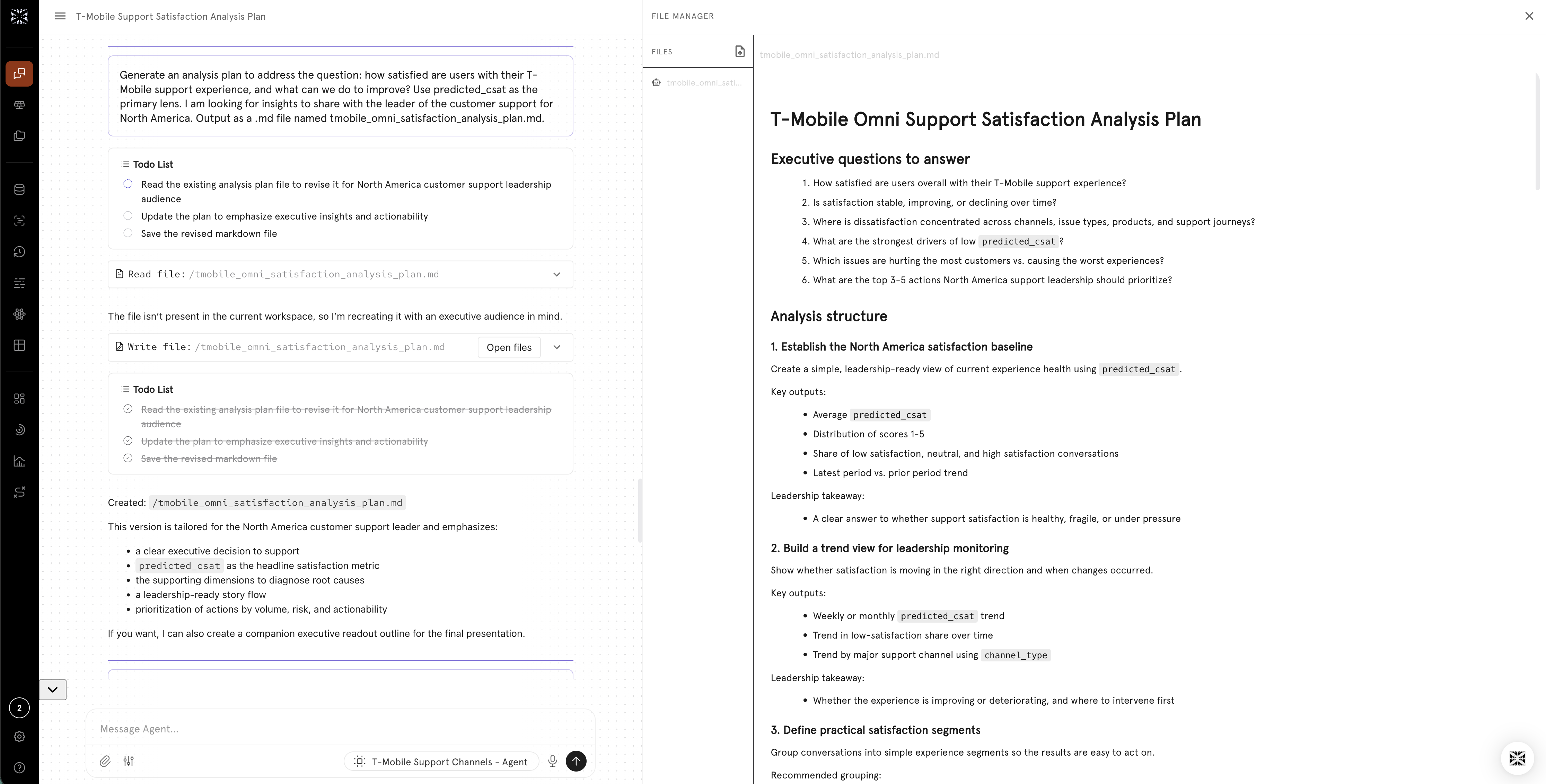
Once your plan is generated, view it alongside the chat and continue to revise and build on it.
Add guidance on actionability
Tell your Agent which dimensions or metrics should be linked to actionability.
Example prompts
Incorporate the enriched dimensions for effort (1–5, 5 = high effort) and rating (predicted rating 1–10, 10 = best). Use these as a primary signal for identifying areas of user friction with the bot.
Use the custom dimension predicted_csat to execute a root cause analysis of the drivers of dissatisfaction for customers.
Identify action items based on which topics are linked with product_dissatisfaction vs agent_dissatisfaction.
User action: Align your Agent with a key metric or action level, when applicable.
Why this step matters: Causal Intelligence is designed to produce actionable insights. But you need to define what counts as actionable: what signals indicate a problem, what outcomes matter, and which dimensions should be treated as primary evidence.
Pro tip
Use this step to identify candidate outcome metrics. A predicted score, such as rating or effort, is often more broadly available than sparse metadata fields.
- Turnkey scores: The
System_Session_Prompttable includes turnkey predictive score options. If you do not see data in this table, kick off a backfill. - Custom scores: Create your own predictive score when you need a metric tailored to your business.
- Revenue outcomes: Link actionability with outcomes like MRR, LTV, purchase amount, repeat purchase, or other revenue measures.
Clarify the scope
If needed, direct your Agent to refocus on specific prompts, tables, or dimensions.
Example prompts
Focus on the fields in structured_metadata, like intents, answers, fallback, and don't-know responses. I don't remember the exact dimension names, but you'll find them in the metadata.
Include seat section, gate of entry, and fan segments in the analysis.
Do not use any of the custom_fields labeled 2024.
Then ask your Agent to validate the field selection: Confirm the dimensions are the right ones to use for answering the question. Are there any others we should consider?
User action: Prevent the plan from being built on an incomplete or weak field selection.
Why this step matters: Make sure your Agent includes all dimensions relevant to answering the question. When metadata is extensive and the initial business question is intentionally open, you may need to iterate on the fields your Agent includes.
Pro tip
This is the core editing loop for analysis plans: keep the generated plan file open beside the conversation, review it as a document, and continue refining it with your Agent. Use the file manager icon in the text input box to view the plan alongside the chat.
When you want a change, direct your Agent to update the file itself, not only the chat response. For example: Revise the plan file XXX_analysis_plan.md. This keeps the reusable plan current as your thinking evolves.
Optimize the plan
Work with your Agent as a partner to improve the breadth and depth of the research proposal.
Example prompts
Is there anything else we need to add to this analysis plan to make the insights more actionable or specific to the business question?
How would you further optimize this plan?
User action: Let your Agent suggest improvements.
Why this step matters: Open-ended review questions are a high-value way to improve an analysis plan. Your Agent may identify missing segments, better outcome metrics, stronger comparisons, or a clearer deliverable structure.
Add stakeholder implications
Ask your Agent to go beyond analysis and answer the question: 'so what?' for your stakeholers.
Example prompt
Include a section with clearly defined stakeholder-ready implications and action items for the business.
User action: Ask for a plan that includes stakeholder-ready insights.
Why this step matters: The plan can generate an analysis/report that is specifically tuned to the needs of the end-consumers of the insights: product managers, department leads, executive leadership, and point toward concrete actions.
Prepare for handoff
Ask whether operational details should be added to reduce friction during execution.
Example prompt
This plan will be executed in a separate thread. Add any operational details at the start needed to ensure a smooth handoff to the Agent.
User action: Make sure the document includes all necessary context.
Why this step matters: Plans need to be readable as stand alone documents outside the context of the conversation used to draft them. Ask your Agent to suggest any additional details that may be useful to include.
Pro tip
OpenAI and Anthropic recommend starting new conversation threads at key points in a process. A clean thread helps separate planning from execution.
Run the plan
Download the plan file and upload it to a new thread to execute.
Example prompt
Execute the plan file XXX_analysis_plan.md.
User action: Kick off the analysis.
Why this step matters: Create a clean handoff from planning into execution and make the analysis easier to manage as a separate piece of work.
Pro tip
Rename the thread to match the work you are starting, using the format Plan for _____.
Updated 4 months ago